SYSTEM DESIGN:Lesson 7: How Short Links Actually Work
Mastering lesson 7: how short links actually work concepts and implementation.
The WhatsApp link problem
Someone drops a product link in a family WhatsApp group. It is 187 characters long — tracking params, affiliate tags, the works. Half the message is URL. Nobody clicks it because it looks suspicious.
bit.ly, TinyURL, and your own schoolabe.com/x/K7mPq exist for one job: turn a long URL into a short code that redirects to the original. Simple idea. The design decisions start the moment you ask "how do I generate that code?"
This chapter covers the core of a URL shortener — requirements, ID generation, collision handling, and API shape. No CDN, no Redis cache, no million-QPS math. That comes next.

Nobody clicks a link that looks like a legal document
Your aunt did not click it. Your aunt will never click it. Shorten the link.
Requirements — functional and non-functional
Functional
- Shorten — given a long URL, return a short code (e.g.,
K7mPq) - Redirect — given a short code, HTTP 301/302 to the original URL
- Optional: custom aliases (
schoolabe.com/x/my-resume) - Optional: expiration, click analytics, password protection
Non-functional (state these in interviews)
- Low latency on redirect — users expect < 100 ms; this is the hot path
- High availability on redirect — a broken short link is worse than a slow one
- Uniqueness — two different long URLs must not get the same short code
- Scale hint: read-heavy (100:1 redirect-to-create ratio is typical)
Clarify with the interviewer: do we need user accounts? Custom aliases? Analytics? Scope creep kills you in 45 minutes. I usually commit to shorten + redirect + basic click count, skip auth unless asked.
Clarifying with the interviewer (say this out loud)
Do not draw boxes until you have answers. A script that works in most rooms:
You: "Can you walk me through an example? Long URL in, short link out,
     click short link, browser lands on the original page?"
     -> Interviewer: "Yes, like bit.ly."

You: "What scale are we designing for? New links per day, and how
     many redirects compared to creates?"
     -> Interviewer: "100 million new URLs per day, reads dominate."

You: "How short should the code be? Alphanumeric only?"
     -> Interviewer: "As short as practical — letters and numbers."

You: "Can users delete or edit links, or is create-once enough?"
     -> Interviewer: "Keep it simple — no delete for now."

You: "I will cover shorten + redirect, 7-character codes, high
     availability on redirect. I will mention analytics and rate
     limiting if we have time."
That five-minute exchange sets scope. You are not guessing requirements — you are negotiating them. Interviewers notice.
Napkin math before you design (state these numbers)
Assume the interviewer gives you 100 million new URLs per day and a 100:1 read-to-write ratio (redirects vs creates). Round aggressively — within 2x is fine.
Writes (create short link):
100M / day / 86,400 sec ~ 1,200 writes/sec average
Peak (3x lunch + evening): ~3,600 writes/sec
A single Postgres primary handles that. Writes are not the scary part.
Reads (redirect):
1,200 x 100 = 120,000 reads/sec average
Peak (3x): ~360,000 reads/sec
Viral IPL link (10x on one code): CDN + Redis absorb most of this
Storage (10-year horizon, optional but impressive):
100M/day x 365 x 10 ~ 365 billion rows
~600 bytes per row (code + URL + metadata)
365B x 600 B ~ 220 TB raw (before replicas)
You do not need a calculator — you need the shape: writes are modest, reads are huge, disk grows linearly with links created. That shape drives cache and CDN in Lesson 8.
High-level flow
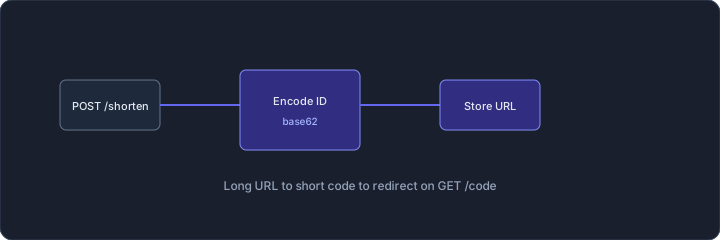
URL shortening and redirect flow
Two paths:
Create (write path): Client POSTs long URL → server generates short code → stores mapping in DB → returns short URL.
Redirect (read path): Browser GETs /x/K7mPq → server looks up code → returns 301/302 to long URL.
Redirect is called 100× more often than create. Keep that ratio in your head — it drives every scaling decision in the next chapter.
How to generate the short code
Three approaches. Each has trade-offs interviewers expect you to compare.
Option 1: Hash the long URL (MD5 / SHA-256)
import hashlib
import base64

def short_code(long_url: str, length: int = 7) -> str:
    digest = hashlib.md5(long_url.encode()).digest()
    # base64 gives A-Z, a-z, 0-9, +, / — trim to alphanumeric
    b64 = base64.urlsafe_b64encode(digest).decode()
    return b64[:length]
Pros: deterministic — same URL always gets same code (dedup for free). No central counter.
Cons: collisions. MD5 truncated to 7 chars is not unique across billions of URLs. Two different URLs can hash to the same prefix.
Fix: on collision, append a salt and re-hash, or fall back to counter. Pure hash-only is risky at scale.
I would not lead with hash in an interview unless dedup is a stated requirement ("do not create duplicate short links for the same URL").
Option 2: Auto-increment counter
-- Single row counter, incremented atomically
UPDATE counters SET value = value + 1 WHERE name = 'url_id' RETURNING value;
-- id = 912847263 → encode to base62 → "kF3xP"
Pros: guaranteed unique IDs, simple logic, easy to reason about.
Cons: single counter is a write bottleneck at extreme scale; IDs are predictable (competitor can guess your next short code).
Predictable IDs matter if short links are private. schoolabe.com/x/100001, 100002 — someone can scrape your sequential links. Encode the counter in base62 to obscure length, but order is still guessable.
Option 3: Base62 encode a unique ID (recommended default)
Take a unique numeric ID (from counter, Snowflake, UUID stripped to int) and encode in base62:
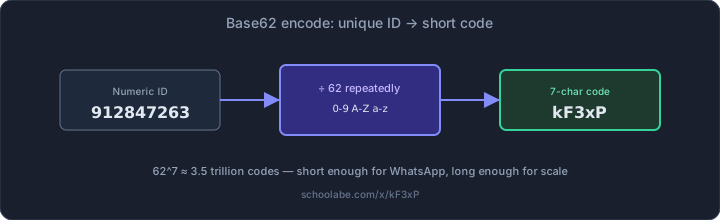
Base62 encode example: numeric ID to 7-character short code
BASE62 = "0123456789ABCDEFGHIJKLMNOPQRSTUVWXYZabcdefghijklmnopqrstuvwxyz"

def encode_base62(num: int) -> str:
    if num == 0: return BASE62[0]
    chars = []
    while num > 0:
        chars.append(BASE62[num % 62])
        num //= 62
    return "".join(reversed(chars))

# 912847263 → "kF3xP" (example)
Why base62? Uses [A-Za-z0-9] — URL-safe, no encoding needed. Base64 has + and / which need escaping in URLs.
Capacity math:
| Code length | Base62 combinations |
|---|---|
| 6 chars | 62^6 ≈ 56 billion |
| 7 chars | 62^7 ≈ 3.5 trillion |
| 8 chars | 62^8 ≈ 218 trillion |
7 characters is the sweet spot — short enough for WhatsApp, long enough for any realistic URL count. bit.ly uses 7. TinyURL uses 6–7.
My interview pick: auto-increment ID (or Snowflake at scale) + base62 encode. Clear, collision-free, easy to explain in 2 minutes.
The six-step shorten flow (counter + base62)
This is the write path interviewers want you to narrate. Not "we hash it" — a concrete sequence you can draw in 90 seconds.
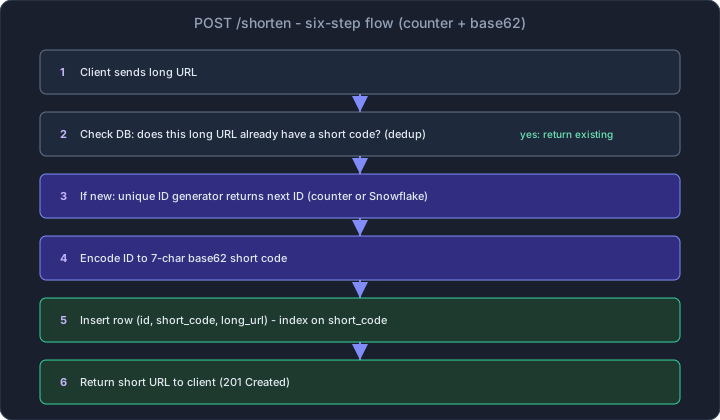
Six-step URL shortening flow
- Client POSTs the long URL.
- Dedup check — if this exact long URL was shortened before, return the existing short code (product choice; analytics products often create a new code per user instead).
- Generate unique ID — counter
nextval()on one DB, or Snowflake/UUID-based ID at scale (Lesson 14). - Base62-encode the ID to a 7-character code.
- Insert
(id, short_code, long_url); unique index onshort_code. - Return
201with the full short URL.
def shorten(long_url: str) -> str:
    existing = db.find_by_long_url(long_url)
    if existing:
        return existing.short_url
    new_id = id_generator.next()
    code = encode_base62(new_id)
    db.insert(id=new_id, short_code=code, long_url=long_url)
    return f"https://schoolabe.com/x/{code}"
Collision handling
With counter + base62, collisions do not happen — IDs are unique by construction.
With hash-based generation, you need a strategy:
def shorten_with_hash(long_url: str) -> str:
    for attempt in range(5):
        salt = "" if attempt == 0 else str(attempt)
        code = short_code(long_url + salt)
        if not db.exists(code):
            db.insert(code, long_url)
            return code
    raise Exception("Could not generate unique code")
Also handle dedup: if the same long URL is submitted twice, do you return the existing short code or create a new one? Product decision. Analytics-heavy products create new codes per user; dedup-friendly products return existing.
Bloom filter (hash-based paths only)
If you use truncated hash codes instead of counters, every new code might collide. Checking Postgres SELECT 1 FROM urls WHERE short_code = ? on every attempt is slow at high create volume.
A Bloom filter is a compact in-memory structure that answers "might this short code exist?" with possible false positives but no false negatives. Flow:
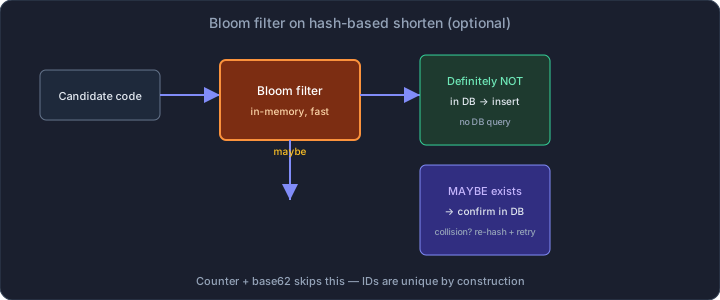
Bloom filter decision flow for hash-based short codes
- Hash candidate code → Bloom filter says definitely not in DB → insert without query.
- Bloom filter says maybe exists → confirm with DB; on collision, re-hash with salt and retry.
With counter + base62 you skip Bloom filters entirely — IDs are unique by construction. Mention Bloom filters only if the interviewer pushes on hash-based shortening.
Database schema (minimal)
CREATE TABLE urls (
  id          BIGSERIAL PRIMARY KEY,
  short_code  VARCHAR(8) NOT NULL UNIQUE,
  long_url    TEXT NOT NULL,
  created_at  TIMESTAMP DEFAULT NOW(),
  expires_at  TIMESTAMP NULL,
  click_count BIGINT DEFAULT 0
);

CREATE UNIQUE INDEX idx_short_code ON urls(short_code);
Redirect path queries by short_code — that index is non-negotiable. long_url index only if you dedup on lookup.
For a single-server MVP, Postgres handles this fine. 10,000 redirects/sec is where you start thinking about cache — next chapter.
API design
Create short URL
POST /api/v1/urls
Content-Type: application/json

{ "long_url": "https://amazon.in/dp/B0CX12345?ref=affiliate_very_long_tag" }
HTTP/1.1 201 Created

{
  "short_url": "https://schoolabe.com/x/kF3xP",
  "short_code": "kF3xP",
  "long_url": "https://amazon.in/dp/B0CX12345?ref=affiliate_very_long_tag",
  "created_at": "2026-08-28T10:30:00Z"
}
Redirect
GET /x/kF3xP
HTTP/1.1 301 Moved Permanently
Location: https://amazon.in/dp/B0CX12345?ref=affiliate_very_long_tag
301 vs 302:
- 301 Permanent — browsers and CDNs cache the redirect. Good for stable links, reduces server load.
- 302 Temporary — no caching. Use when URLs expire or you need accurate click tracking through your server.
Most shorteners use 301 for public links and 302 when analytics must count every click. Mention both; pick based on requirements.
Error cases
404— short code not found410 Gone— link expired400— invalid long URL (malformed, not http/https)
Validate long URLs server-side. Do not redirect to javascript:alert(1) — that is an open redirect vulnerability and a security interview trap.
Custom aliases
Product teams always ask for branded links: schoolabe.com/x/rohit-resume instead of kF3xP. Implementation:
POST /api/v1/urls
{ "long_url": "https://...", "custom_alias": "rohit-resume" }
- Validate alias:
[a-zA-Z0-9-_], length 3–20, no reserved words - Check uniqueness before insert — race condition on popular words ("sale", "offer")
- Store in same
urlstable; lookup path identical to generated codes
Custom aliases are a write-path feature only. Redirect path does not care whether the code was generated or chosen.
Analytics without slowing redirects
If you need click counts, do not UPDATE urls SET click_count = click_count + 1 synchronously on every redirect. That turns a read-heavy system write-heavy.
Better approach:
- Return 301 immediately
- Fire-and-forget an async event (
click_eventsqueue or Kafka topic) - Worker aggregates counts every minute into a dashboard table
Users get fast redirects. Product gets hourly analytics. Exact real-time counts are rarely worth the latency cost.
Security checks (do not skip)
- Blocklist — phishing sites, malware domains
- Allowlist scheme — only
http://andhttps:// - Rate limit — prevent someone from filling your DB with garbage URLs (ties to rate limiter chapters)
- Custom alias validation — reserved words (
admin,api,login)
What a single-server version looks like
For 100 users and a side project:
- One Node/Go/Python server
- Postgres with the schema above
- Counter + base62 for codes
- 301 redirects
- Deploy on Railway or a single EC2 t3.small
Total cost: under ₹2,000/month. Handles thousands of redirects per day easily.
Preview: why the next chapter exists
Everything above runs on one server. Postgres handles ~5,000 simple indexed lookups per second on decent hardware. Redis is not in the picture yet.
Problems that appear past that point:
- Viral link → single row hot in DB → connection pool exhaustion
- Global users → redirect latency from distant origin
- 100:1 read ratio → you are paying DB cost for traffic that never needed a write system
The fix is not a fancier hash function. It is caching, CDN, and read replicas — the standard toolkit from the scaling chapters.
It works for 100 users. IPL final day hits. Continue here: Scaling a URL Shortener to Millions of Redirects.