SYSTEM DESIGN:Lesson 1: When One Server Isn't Enough
Mastering lesson 1: when one server isn't enough concepts and implementation.
Practice this chapter
Read the theory, then wire up the architecture yourself. These labs match what you just learned.
What this lesson answers
One server can only handle so much traffic. When it is full, you either buy a bigger machine (vertical scaling) or add more machines behind a load balancer (horizontal scaling).
That is the whole idea. The rest of this page explains when to use each, what breaks on one box, and what to say in an interview.
What runs out on one server
Your API, database, and cache can all sit on one machine at the start. That machine has fixed limits. When any limit is full, requests get slow or fail.
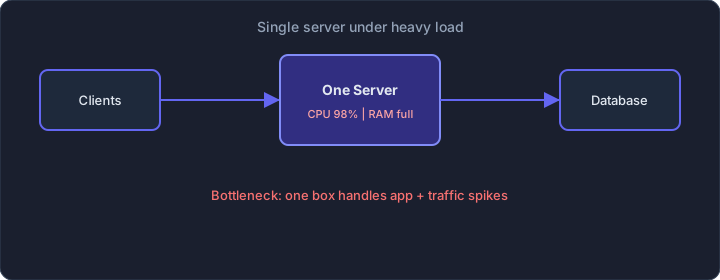
Single server bottleneck under traffic spike
| Resource | What fills up | What you see |
|---|---|---|
| CPU | Work per second | Slow responses, timeouts |
| RAM | Data in memory | Process killed, heavy swapping |
| Disk | Read/write speed | Queries waiting |
| Network | Bytes in and out | Slow downloads, drops |
| Connections | Open client or DB sockets | "Too many connections" |
During an IPL final, a fantasy sports app might see 10 lakh users refreshing scores every 5 seconds. 10 lakh is 1,000,000, so if those refreshes are spread across the 5 seconds the average is 1,000,000 ÷ 5 = 200,000 requests per second. One server will not carry that. The CPU-bound check below is arithmetic you can do on a whiteboard.
CPU-bound check:
Max RPS ≈ number of cores ÷ CPU time per request, in seconds

Example assumption: 4 cores, each request uses 10 ms (0.010 s) of CPU
4 ÷ 0.010 = 400 RPS ceiling
A planning margin of about half → ~200 RPS
The 10 ms figure is an assumption for this example. Swap in a CPU-time trace from your own server when you have one. If a request really kept one core busy for the whole 200 ms, that core would serve 1 ÷ 0.2 = 5 requests per second, and four cores would serve 4 ÷ 0.2 = 20. The same 20, with latency written in milliseconds: (4 × 1,000) ÷ 200 ms = 20. Multiply by 1,000 only when the denominator is in milliseconds.
In a typical API, most of a 200 ms response is waiting on the database or the network. While a request waits it does not use a core, so a second limit applies: how many requests the server can keep in flight at once (Little's law).
RPS ≈ requests in flight ÷ latency in seconds

This example uses 2 ms of CPU per request. That is a different assumption from the 10 ms above.
4 cores ÷ 0.002 s = 2,000 RPS
Requests in flight = 2,000 RPS × 0.2 s = 400
That 400 is a count of requests in flight. The 400 RPS above was a rate from the 10 ms example.
The 2 ms figure is only for this example. At 2 ms, all four cores are busy, and 400 requests are in flight at any moment. If the server's worker or connection limit is below 400, that limit becomes the bottleneck before the CPU does.
An N+1 query loop that multiplies CPU time by 10 (2 ms → 20 ms) drops the ceiling from 4 ÷ 0.002 = 2,000 RPS to 4 ÷ 0.020 = 200 RPS. To serve the 200,000 RPS from the IPL example at 2,000 each, you need 200,000 ÷ 2,000 = 100 such servers, before any extra headroom.
Vertical scaling: one bigger machine
Vertical scaling means more CPU, RAM, or faster disk on the same server. Often no app code change.
Use it when:
- Traffic is still moderate
- You need a fix quickly
- The database is hard to split across machines
Limits:
When it stops working:
- Cloud providers cap instance sizes (you cannot buy infinite RAM)
- Downtime during resize — you often reboot the machine
- Single point of failure remains: one fire takes down everything
- A bigger machine costs in proportion, and the ceiling stays. On the AWS Linux on-demand list for Asia Pacific (Mumbai), file dated 25 September 2026, m6i.2xlarge (8 vCPU) is $0.404/hour and m6i.16xlarge (64 vCPU) is $3.232/hour: 8× the vCPUs, 8× the price. Resizing buys no discount per core, and the work still sits on one machine. EC2 on-demand pricing.
A bigger machine can carry one festival spike. It is still a single machine, with a ceiling and a single point of failure.
Horizontal scaling: more machines
Horizontal scaling means several same app servers. A load balancer sends each request to one of them. More servers → more capacity.
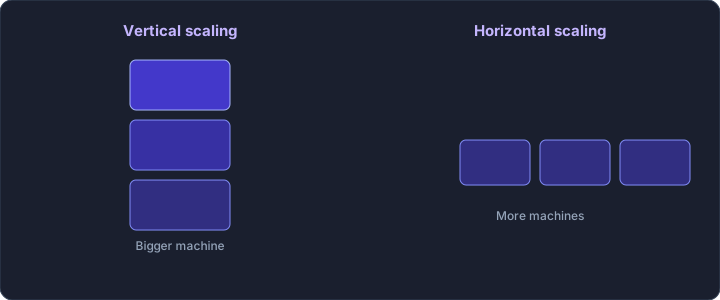
Vertical scaling vs horizontal scaling
| Vertical | Horizontal | |
|---|---|---|
| How | Bigger single machine | More identical machines |
| Code changes | Usually none | Often requires stateless design |
| Failure mode | One machine dies → total outage | One machine dies → others absorb load |
| Cost curve | Proportional to size, then a size cap | Proportional to the number of machines |
| Ceiling | Hardware max | Theoretically very large |
UPI is the example most Indian students know. NPCI's product statistics list 24,508.96 million transactions in August 2026 (24.51 billion). The table note says that count excludes transactions that debit and credit the same account. Source: NPCI UPI product statistics.
August has 31 × 86,400 = 2,678,400 seconds
24,508,960,000 ÷ 2,678,400 ≈ 9,151 transactions per second
Transactions are not HTTP requests. If you treated each transaction as one request and used the 2,000 RPS assumption from the check above, the average would be 9,151 ÷ 2,000 ≈ 4.6 servers, before peak and headroom. That is a sizing exercise, not UPI's server count. One payment is several requests across the app, the payment provider, and the banks. Peaks sit above that average, and the work is spread across many banks' systems.
The catch: your application must be stateless at the server layer.
If user session data lives only in Server A's memory, and the next request lands on Server B, the user gets logged out. That is why production apps store sessions in Redis, not in-process memory.
Bad:  login → session only in Server A memory
      next request → may hit Server B → user looks logged out

Good: login → session in Redis (or similar shared store)
      any app server can read that session
Without shared sessions (or tokens that do not need server memory), horizontal scaling causes random logout bugs.
Load balancer
Clients talk to the load balancer. It picks a healthy app server and forwards the request.
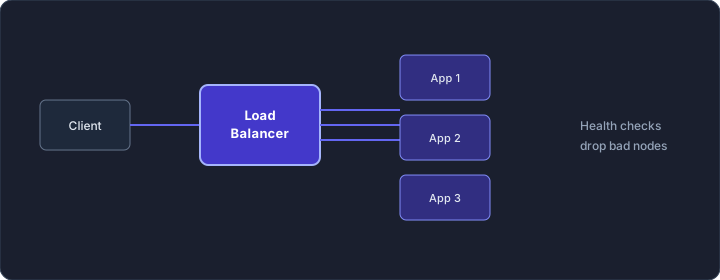
Load balancer distributing traffic across app servers
| Method | What it does | Typical use |
|---|---|---|
| Round robin | A, then B, then C, repeat | Equal servers, short requests |
| Least connections | Server with fewest open connections | Long connections (e.g. WebSockets) |
| Weighted | Stronger servers get more traffic | Mixed sizes |
| IP hash | Same client IP → same server | Avoid if you can; breaks when IP changes |
Layer 4 vs Layer 7 (short):
- Layer 4: routes by IP and port. Fast.
- Layer 7: can look at the HTTP path or headers. Example:
/api/paymentsto one group,/api/feedto another.
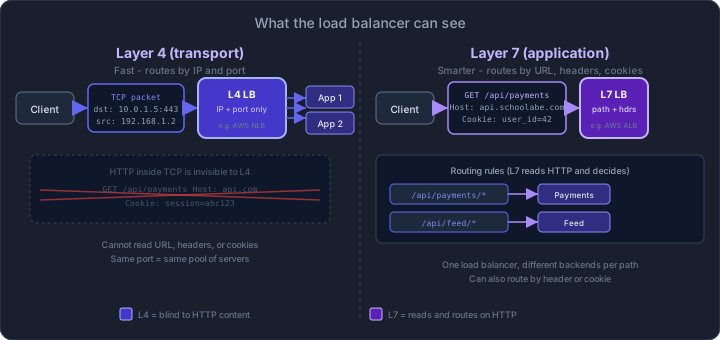
Layer 4 vs Layer 7 load balancer comparison
For most REST APIs, Layer 7 is the usual choice. Health checks matter more than the algorithm: stop sending traffic to a dead server (for example, call /health every few seconds).
Order of growth (simple story)
- One small server — fine for a small project.
- Bigger server — when the box is full and you need time.
- Load balancer + several app servers — when one box is not enough and you want redundancy. Sessions in Redis. Database still often one machine.
- Fix the data layer — replicas, cache, CDN (next lesson).
Let us walk through how a food delivery startup might scale — because everyone in India has an opinion on Swiggy latency.
Stage 0 — MVP (1 server):
One server. Node.js API + PostgreSQL + file uploads on disk. Handles 500 orders/day. Fine.
Stage 1 — Vertical scale (1 bigger server):
Traffic hits 5,000 orders/day. Upgrade from t3.medium (2 vCPU, 4 GiB) to t3.xlarge (4 vCPU, 16 GiB). On that same Mumbai Linux list, the rates are $0.0448/hour and $0.1792/hour — $0.1792 ÷ $0.0448 = 4. That is 4× the price for 2× the vCPUs and 4× the memory. The list moves, so check it again before you quote the ratio. The bigger box still has a ceiling.
Stage 2 — Horizontal app tier (load balancer + 3 app servers):
Weekend lunch rush causes 30-second page loads. Add an ALB, three stateless API servers, sessions in Redis. Database still on one machine — now that is the bottleneck.
Stage 3 — Data layer scaling (next chapter):
Read replicas, caching, CDN for restaurant images. This is where the real engineering lives.
Notice the pattern: scale the app tier first (cheap, stateless, easy), then attack the data tier (hard, stateful, where consistency trade-offs live).
Mistakes to avoid
- Scaling when traffic is still tiny (extra machines add work, not magic)
- Scaling the wrong layer (more apps waiting on one slow DB)
- Horizontal scale with sessions only in server RAM
- Load balancer with no health checks
- Sticky sessions as the default (prefer shared session store)
Say this in an interview
- Estimate load (users, requests per day, peak).
- Name the bottleneck (CPU, memory, DB, network).
- App tier: stateless servers + load balancer.
- Then data tier: replicas, cache, sharding (next lesson).
- Measure, then change again if needed.
A clear line: "I would put the app behind a load balancer on several stateless servers, and store sessions outside the app process."
Practice
- Scaling Lab — add servers and compare throughput
- Request Flow Lab — follow a request through the layers
Next
After the app tier, the database is usually next. Continue: Scaling the Data Layer.