SYSTEM DESIGN:Lesson 15: How Web Crawlers Actually Work
Mastering lesson 15: how web crawlers actually work concepts and implementation.
IPL final night, and Google wants the score
The IPL final ends at 11:47 PM. Within three minutes, Cricbuzz publishes "CSK win by 6 wickets." Times of India posts a match report. ESPNcricinfo updates player stats. Google Search needs all of that indexed before your friend types "IPL final score" at midnight.
Nobody at Google manually copies HTML. A web crawler — a polite, relentless bot — discovers URLs, fetches pages, extracts links and text, and feeds a search index. Same machinery that indexed your college project blog also chases breaking cricket news.
This chapter covers the core crawler: requirements, components, politeness rules, a simple schema, and what runs on one server. Distributed crawling across thousands of machines is the next lesson.

Polite crawler bot at Cricbuzz door after IPL final
robots.txt says wait 1 second. IPL fans say now.
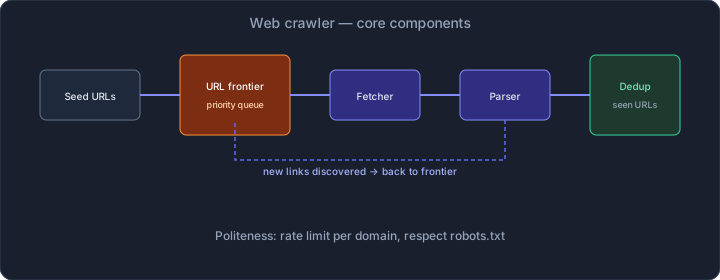
Web crawler architecture from seed URLs to document store
Requirements — functional and non-functional
Functional
- Discover — start from seed URLs and follow links to find new pages
- Fetch — download HTML (and optionally CSS/JS) over HTTP/HTTPS
- Parse — extract text, title, outbound links, metadata
- Store — persist raw HTML and parsed fields for downstream indexing
- Dedup — never fetch the same canonical URL twice in one crawl cycle
- Respect robots.txt — skip disallowed paths per domain
Non-functional (say these in interviews)
- Politeness — cap requests per domain so you do not DDoS Cricbuzz during a final
- Freshness — re-crawl high-change pages (news) more often than static pages
- Scale hint — billions of URLs in the wild; your MVP crawls thousands
- Fault tolerance — one timeout should not kill the whole crawl
Clarify scope early: are we building Google or a sitemap checker for your startup? I usually commit to discover + fetch + parse + store + dedup + robots.txt. Skip JavaScript rendering unless the interviewer insists.
Clarifying with the interviewer (say this out loud)
You: "Walk me through an example — seed URL, fetch page, extract links,
     queue new URLs, store content?"
     -> Interviewer: "Yes, like a search engine crawler."

You: "What scale? Pages per day, and how many domains?"
     -> Interviewer: "Start with one server, millions of pages eventually."

You: "Do we render JavaScript SPAs, or plain HTML is enough?"
     -> Interviewer: "HTML only for now."

You: "Must we obey robots.txt and rate limits per domain?"
     -> Interviewer: "Yes — politeness is non-negotiable."

You: "I will cover frontier queue, fetcher, parser, Bloom-filter dedup,
     document store, and a read API for crawled pages."
That exchange saves you from designing headless Chrome for a problem that asked for curl and BeautifulSoup.
High-level components
Think of the crawler as a loop with six moving parts:
Seed URLs -> URL Frontier -> Fetcher -> Parser -> Dedup check -> Document Store
                              ^                                    |
                              +-------- new links -----------------+
| Component | Job |
|---|---|
| **Seed URLs** | Starting points — homepage, sitemap.xml, news section |
| **URL Frontier** | Priority queue of URLs waiting to be fetched |
| **Fetcher** | HTTP client — GET with timeouts, redirects, gzip |
| **Parser** | Extract `<a href>`, title, body text from HTML |
| **Dedup** | "Have we seen this URL?" — Bloom filter + optional DB |
| **Document Store** | Raw HTML + parsed fields on disk or DB |
The frontier is the heart. Everything else is plumbing around "what URL do I fetch next?"
Seed URLs — where the crawl begins
You cannot crawl the entire web from zero. Every crawl starts with seeds:
https://www.cricbuzz.com/— cricket news during IPLhttps://timesofindia.indiatimes.com/sports/cricket— mainstream coveragehttps://www.espncricinfo.com/— stats-heavy pages
Also ingest sitemap.xml — site owners literally publish a list of URLs they want indexed. Ignoring sitemaps is leaving free discovery on the table.
SEEDS = [
    "https://www.cricbuzz.com/",
    "https://www.cricbuzz.com/cricket-news",
    "https://www.cricbuzz.com/sitemap.xml",
]
for url in SEEDS:
    frontier.enqueue(url, priority=HIGH)
Seeds are not sacred forever. After the first pass, the frontier is fed entirely by links found on fetched pages.
URL Frontier — priority queue, not FIFO
A naive FIFO queue crawls pages in random discovery order. Real crawlers prioritize:
- Freshness — news pages from the last hour beat a 2019 archive
- Depth — important hub pages (homepage) before deep comment threads
- Domain budget — spread work across domains instead of hammering one site
During IPL final night, Cricbuzz /live-cricket-scores should jump ahead of /profiles/old-player.
import heapq

class Frontier:
    def __init__(self):
        self.heap = []  # (negative_priority, url)

    def enqueue(self, url: str, priority: int):
        heapq.heappush(self.heap, (-priority, url))

    def dequeue(self) -> str | None:
        if not self.heap:
            return None
        return heapq.heappop(self.heap)[1]
On one server, an in-memory heap works until you run out of RAM. At scale, the frontier moves to Redis or Kafka — Lesson 16.
Fetcher — HTTP done right
The fetcher is a disciplined HTTP client:
- User-Agent — identify yourself (
SchoolabeBot/1.0 (+https://schoolabe.com/bot)) - Timeouts — connect 5s, read 30s; hung connections stall the whole loop
- Redirects — follow up to 5 hops; normalize final URL before dedup
- Compression — send
Accept-Encoding: gzipto save bandwidth - Status codes — store 200; log 404/500; do not retry 404 forever
def fetch(url: str) -> FetchResult:
    resp = requests.get(
        url,
        headers={"User-Agent": BOT_UA},
        timeout=(5, 30),
        allow_redirects=True,
    )
    return FetchResult(
        final_url=resp.url,
        status=resp.status_code,
        body=resp.content,
        headers=dict(resp.headers),
    )
Never fetch without checking robots.txt and domain rate limits first. That is not optional polish — it is how you avoid getting blocked.
Parser — links out, text out
Given HTML bytes, the parser returns structured data:
- Title —
<title>or Open Graphog:title - Text — strip tags, collapse whitespace (for search snippets)
- Links — every
<a href>resolved to absolute URL - Canonical URL —
<link rel="canonical">if present (dedup key)
from urllib.parse import urljoin, urlparse
from bs4 import BeautifulSoup

def parse(html: bytes, base_url: str) -> ParsedPage:
    soup = BeautifulSoup(html, "html.parser")
    links = []
    for a in soup.find_all("a", href=True):
        abs_url = urljoin(base_url, a["href"])
        if urlparse(abs_url).scheme in ("http", "https"):
            links.append(normalize_url(abs_url))
    canonical = soup.find("link", rel="canonical")
    canonical_url = canonical["href"] if canonical else base_url
    return ParsedPage(title=soup.title.string, links=links, canonical=canonical_url)
URL normalization matters: http://cricbuzz.com/page/ and http://cricbuzz.com/page might be the same page. Strip fragments (#section), lowercase host, trailing slash policy — pick one rule and stick to it.
Dedup — Bloom filter first, database second
The web is full of duplicate links. Footer nav appears on every page. Without dedup, you fetch cricbuzz.com/about ten thousand times.
Two-layer approach:
- Bloom filter in memory — "probably seen" in O(1) with tiny memory. False positives mean you skip a URL you never fetched (acceptable). False negatives never happen.
- URL store (Postgres/SQLite) — exact check on Bloom filter miss before enqueueing
from pybloom_live import BloomFilter

seen_bloom = BloomFilter(capacity=10_000_000, error_rate=0.001)

def should_crawl(url: str) -> bool:
    if url in seen_bloom:
        return False  # probably already queued or fetched
    if db.url_exists(url):
        seen_bloom.add(url)
        return False
    seen_bloom.add(url)
    return True
Bloom filters are the same idea as in URL Shortener Core — cheap membership test before an expensive lookup.
Politeness — robots.txt and rate limits
Crawling without politeness gets you blocked, sued, or both.
robots.txt
Every domain publishes rules at /robots.txt:
User-agent: *
Disallow: /admin/
Disallow: /private/
Crawl-delay: 1
Cache robots.txt per domain (refresh every 24 hours). Before fetching any URL, check whether the path is allowed.
Rate limit per domain
Even when robots.txt allows crawling, hammering one server is rude. Cap requests:
- 1 request per second per domain — conservative default for news sites
- Separate queue per domain — fetch round-robin across domains
- Track
last_fetch_time[domain]and sleep until the window opens
This is the same mental model as Rate Limiter Algorithms — token bucket per hostname, not per global process.
DOMAIN_DELAY_SEC = 1.0
last_fetch: dict[str, float] = {}

def wait_for_politeness(domain: str):
    elapsed = time.time() - last_fetch.get(domain, 0)
    if elapsed < DOMAIN_DELAY_SEC:
        time.sleep(DOMAIN_DELAY_SEC - elapsed)
    last_fetch[domain] = time.time()
Document store — schema for crawled pages
Store enough for search indexing and debugging:
CREATE TABLE crawled_pages (
    id            BIGSERIAL PRIMARY KEY,
    url           TEXT NOT NULL UNIQUE,
    canonical_url TEXT,
    domain        TEXT NOT NULL,
    status_code   SMALLINT,
    title         TEXT,
    text_content  TEXT,
    raw_html_path TEXT,        -- S3 or local file path
    fetched_at    TIMESTAMPTZ NOT NULL DEFAULT now(),
    content_hash  CHAR(64)     -- SHA-256 of body for change detection
);

CREATE INDEX idx_crawled_domain ON crawled_pages(domain);
CREATE INDEX idx_crawled_fetched ON crawled_pages(fetched_at DESC);
Raw HTML on disk (or S3) keeps Postgres lean. A 500 KB page × 1 million pages = 500 GB — not something you want in row storage on a laptop.
Simple read API
Downstream systems (search indexer, analytics) need a query surface:
GET /api/v1/pages?domain=cricbuzz.com&limit=50&since=2026-05-25T00:00:00Z

200 OK
{
  "pages": [
    {
      "url": "https://www.cricbuzz.com/live-cricket-scores/...",
      "title": "CSK vs MI - Final Live Score",
      "fetched_at": "2026-05-25T23:52:00Z",
      "status_code": 200
    }
  ],
  "next_cursor": "eyJpZCI6MTIzNDU2fQ"
}
GET /api/v1/pages/{url_hash}

200 OK
{
  "url": "https://...",
  "title": "...",
  "text_content": "CSK won by 6 wickets...",
  "raw_html_url": "s3://crawler-bucket/ab/cd/abcd1234.html"
}
Write path is internal (crawler loop). Read path is what your indexer calls.
Main crawl loop — single process
while True:
    url = frontier.dequeue()
    if url is None:
        break
    domain = urlparse(url).netloc
    if not robots.allowed(domain, url):
        continue
    wait_for_politeness(domain)
    result = fetch(url)
    if result.status != 200:
        log_failure(url, result.status)
        continue
    parsed = parse(result.body, result.final_url)
    store.save(url, parsed, result.body)
    for link in parsed.links:
        if should_crawl(link):
            frontier.enqueue(link, priority=score(link))
One Python process, one machine, one Postgres instance. Slow but correct. That is your MVP.
Napkin math — one server, realistic expectations
Assume polite crawling at 1 req/sec average across all domains (some domains idle, news domains active):
1 URL/sec x 86,400 sec = 86,400 pages/day
~2.6 million pages/month on one polite worker
Average page 50 KB HTML -> ~130 GB/month raw storage
That is enough to index a few news verticals during IPL — not the entire Indian web. Scale requires parallel fetchers, which changes every component.
For estimation practice, compare these numbers with Back-of-Envelope Estimation.
What a single-server MVP looks like
For a side project or interview "phase 1":
- One Python/Go worker process
- SQLite or Postgres for URL store + metadata
- Local disk or MinIO for raw HTML
- In-memory Bloom filter + heap priority queue
- Flask/FastAPI read API on the same box
- Deploy on a single EC2 t3.medium (~₹3,000/month)
Total complexity: one repo, one cron to restart on failure, logs to a file. Ship this before you sketch Kubernetes.
Interview traps on the core design
| Pushback | Your answer |
|---|---|
| "Infinite crawl loop?" | Max depth, max pages per domain, frontier size cap |
| "Duplicate content?" | Canonical URL + content hash; skip re-index if hash unchanged |
| "How do you prioritize news?" | Boost priority for URLs matching `/live`, recent sitemap `lastmod` |
| "What about PDFs and images?" | Out of scope unless asked — focus HTML first |
Name what you are not building. Interviewers respect boundaries more than buzzwords.
Preview: why the next chapter exists
One polite worker caps at ~86K pages/day. Google crawls billions. Problems that appear past one server:
- Frontier queue exceeds RAM — need Redis or Kafka
- Single fetcher cannot saturate bandwidth — need worker pool
- Bloom filter too big for one machine — need distributed dedup
- Hot domains during IPL need coordinated rate limits across workers
The core loop stays the same. The infrastructure around it becomes distributed.
Continue here: Web Crawler at Scale.